Automatic treasure
Detects the drilling plane, opens the chest, reads the countdown and spams the click right at the end. Three modes for different play styles.
The tool recognises the game screen, reads the countdown timer and clicks at the right moment so you never miss a treasure.
2–3 day trial · No extra software to install
The V2.1.5 package on Google Drive, bundled with the Vietnamese, English and Korean guides. Unzip into one folder and open Click Last Z.exe.
Download V2.1.5Google Drive · 138.8 MB · guides in 3 languages
2–3 day free trial — Download and try it first, then pay over Telegram if it works for you.
Once downloaded, send your machine ID (Lic tab → COPY) over Telegram to receive your licence. No Python or extra software required.
Every feature toggles on its own, run only what you need.
Detects the drilling plane, opens the chest, reads the countdown and spams the click right at the end. Three modes for different play styles.
Auto-clicks troop healing, rally and alliance while Phase A runs, so you never have to babysit it.
Detects treasure screenshots and pushes them to Telegram. It never clicks on its own, you stay in control.
During your chosen night hours the click rate drops at random to reduce the chance of detection. Set your own start and end times.
The tool resizes the game window to exactly 1280×720 or 1600×900 so the templates line up. No manual tweaking.
Configure the first and second bot separately, and receive treasure alerts together with run status.
Three steps and the tool is running. No technical knowledge, no parameter tuning.
Unzip into a folder and open Click Last Z.exe. Keep the folder intact, the tool needs the asset files next to the exe.
Open the Lic tab, hit COPY for the machine ID and send it over Telegram. Paste the licence you get back, then KÍCH HOẠT.
In the Chung tab, point to Last Z.exe (the tool finds it on its own if you leave it empty), save, then press START.
Pay monthly, every update included. Try it before you decide.
2–3 day trial · No extra software to install
Full refund during the 2–3 day trial if it is not for you
The tool's own manual, with real screenshots and every parameter table. Read it online or grab the PDF.
9 sections · 3 languages · PDF available
Open the guideWatch on YouTube. Each video covers one part in detail: installing, activating your licence, through to enabling the plane click mode.
 2026-08-19Auto Treasure Tool for Last Z | Finds the Plane, Digs and Clicks the ChestWatch video
 2026-06-06Auto Last Z - the tool that grabs treasure for youWatch video
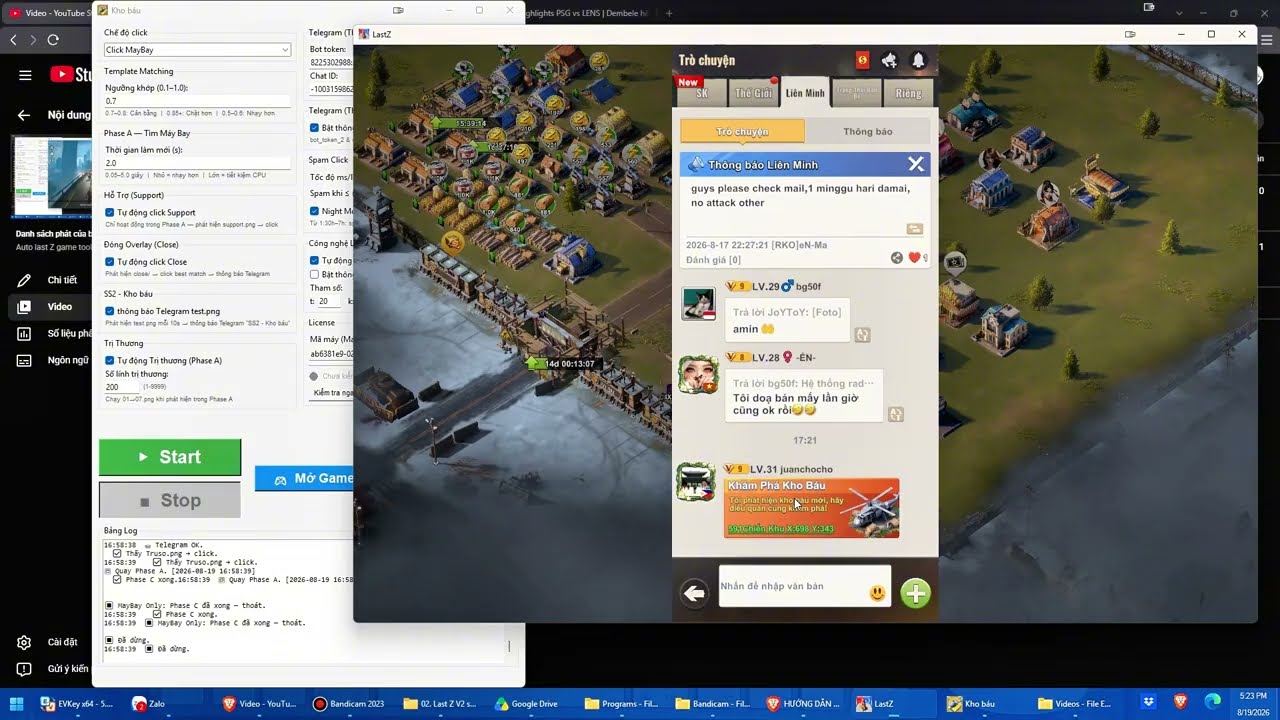 2026-08-19Last Z: Treasure hunting with Plane Click mode (0.2s speed)Watch video
 2026-11-07Introducing the Click Last Z toolWatch video
 2026-10-21Last Z walkthroughWatch video
No. Just unzip the download and open Click Last Z.exe. Every required library ships inside the download.
A Windows PC with 8GB RAM or more runs it comfortably. Plenty of players use a Windows VPS so the game clock never stops.
Yes. It detects on-screen buttons, digs the chest itself, reads the countdown and clicks at the right moment. You press START once.
Yes. The templates were captured from the Vietnamese build, so a different language stops the tool from matching buttons. Switch the game to Vietnamese and you are set.
Not required, the defaults work for most people. If you want to fine-tune, the guide lists every parameter with a recommended value.
The tool handles 1280×720 and 1600×900 and resizes the game window to match so the templates line up. Pick it once in the Chung tab.
The tool warns you before expiry. Send your machine ID over Telegram to extend, no reinstall needed.
Copy the log at the bottom and send it over Telegram, that is the fastest route to support. The log carries enough detail to diagnose remotely.
Scan with your banking or e-wallet app

After the transfer, send a message with a screenshot of the transaction so your licence can be activated quickly.
Scan the QR code with your banking app to transfer, or send the payment manually using the details below.
Buying a licence, getting help with setup, or sending a log when the tool errors, Telegram is the fastest way to reach us.
Replies during working hours · Support in all 3 languages
Quoc Hoan